
Maximizing Platforms
How to best utilize Twitter to promote your brand

Twitter is one of the most used platforms by professionals. News organizations and journalists share breaking news on the platform, it is where many learn news first. Here is my portion of a guide to using Twitter to best accurately represent your brand.
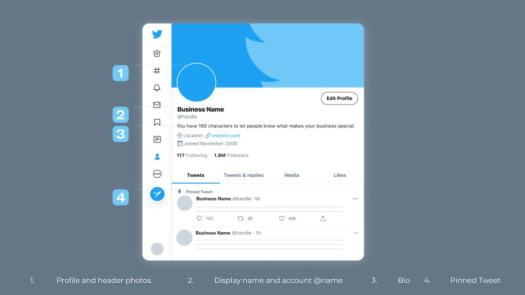
Components to consider when crafting a Twitter page:
1. Profile and header photos
This should be an image that can easily be connected to your brand. Your profile photo shows up next to all your tweets on the timeline, select your profile photo carefully, it should not change often. Your header photo should also reflect your brand. Twitter is primarily text-based so all visual components on your page stand out more than on other platforms, for example, Instagram.
2. Display name and account @name
Your display name will be in bold text above all of your tweets next to your profile picture and account username.
3. Bio
You have a limited number of characters to share what your brand is, keep your bio concise and an accurate representation of your brand.
4. Pinned Tweet
This lives at the top of your tweets on your page. Viewers may not scroll far on your page, but they most likely will view your pinned tweet. If they read nothing else, be sure your pinned tweet is relevant to when it’s viewed and be something you are comfortable with viewers immediately associating with your brand.

This may be the only text viewers of your account read to identify what your brand is. This should be an accurate description of your brand and be relevant to now.
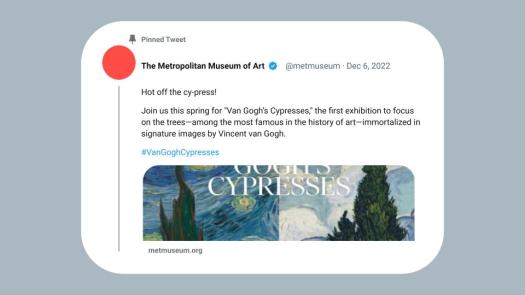
Here is a tweet from The Metropolitan Museum of Art. This is an example of both a great tweet, and a great pinned tweet for many reasons.
Includes a relevant pun/joke
Starting off a tweet with a relevant joke, as this one does with the first sentence “Hot off the cy-press,” engages readers.
Utilizes a hashtag
A hashtag promotes engagement. When patrons visit this exhibition at The Metropolitan Museum of Art they are now encouraged to use this hashtag in any tweets they share.
Contains a link to where you want viewers to go next
Inserting a link in your tweet to where you want your audience to go next makes your next content accessible. Now your viewers don’t have to search your bio for the content that they found engaging and want to learn more about.
Has a visual element
Since Twitter is primarily a text-based platform, all visual/photo aspects present on the timeline makes your tweet stand out and attracts viewers.
It is short!
Now, verified accounts can share tweets exceeding the previous set character limit. In most cases, long tweets deter readers, a short tweet is most likely to be read and engaged with.
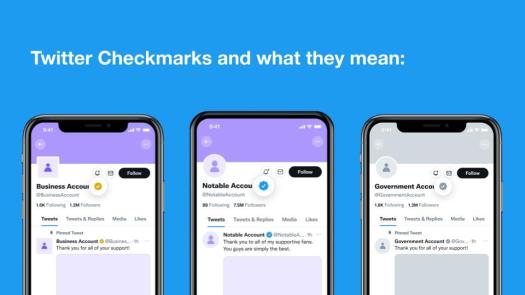
Business accounts have a yellow checkmark next to their display name. Business accounts are distinguished by having a square-shaped profile photo as opposed to all other accounts that have a circle-shaped profile photo. Business account profile photos will be square both at the top of their page and next to their tweets on the timeline.
Notable accounts appear with a blue checkmark following their display name. Notable accounts include all verified notable figures, along with legacy accounts. This checkmark will also appear on accounts that subscribe to Twitter Blue.
Government accounts can be identified by having a gray checkmark alongside their display name. This checkmark is used for all verified government accounts including the president.
February, 2023
 Drea Secchi